Unlock 20% Faster Downloads: Optimizing Internet Speed with New Tech by 2026

Achieve 20% Faster Downloads: Optimizing Your Internet Speed with New Tech in 2026 (PRACTICAL SOLUTIONS)
In an increasingly digital world, the demand for faster, more reliable internet is relentless. From streaming 4K content and competitive online gaming to remote work and smart home ecosystems, every aspect of our lives now hinges on a robust internet connection. While internet service providers (ISPs) continuously upgrade their infrastructure, there are numerous proactive steps you can take to significantly enhance your connection. Our goal today is ambitious yet entirely achievable: to guide you on how to optimize internet speed and achieve a remarkable 20% faster downloads by 2026, leveraging the latest technological advancements and practical strategies.
This isn’t just about throwing money at a problem; it’s about smart optimization, understanding your network, and embracing emerging technologies. We’ll delve into the foundational principles of internet speed, explore the cutting-edge hardware and software solutions available now and on the horizon, and provide actionable tips that you can implement immediately to transform your online experience. By the end of this comprehensive guide, you’ll be equipped with the knowledge to not only understand but also master your internet connection, ensuring you’re ready for the digital demands of tomorrow.
Understanding the Fundamentals of Internet Speed
Before we dive into optimization, it’s crucial to grasp what internet speed truly means. When we talk about speed, we’re primarily referring to two key metrics: download speed and upload speed, both measured in megabits per second (Mbps) or gigabits per second (Gbps). Download speed dictates how quickly you can retrieve data from the internet (e.g., streaming videos, downloading files, loading web pages), while upload speed determines how fast you can send data to the internet (e.g., uploading files, video calls, online gaming interactions).
Several factors influence these speeds:
- Your ISP Plan: The fundamental speed limit is set by the package you subscribe to.
- Network Congestion: High traffic on your ISP’s network or within your own home network can slow things down.
- Hardware: Your modem, router, and the devices you’re using all play a critical role. Older hardware may not support the speeds your ISP provides.
- Wi-Fi vs. Wired Connection: Ethernet cables generally offer faster and more stable connections than Wi-Fi.
- Distance from Router: The farther you are from your Wi-Fi router, the weaker the signal and slower the speed.
- Interference: Other electronic devices, walls, and even neighboring Wi-Fi networks can interfere with your signal.
- Server Speed: The speed of the server you’re connecting to (e.g., for a website or a game) can also be a bottleneck.
To effectively optimize internet speed, we need to address these factors systematically. Our journey to 20% faster downloads starts with a clear understanding of your current setup and identifying potential weaknesses.
Assessing Your Current Internet Performance
The first step in any optimization strategy is to know your baseline. How fast is your internet right now? Numerous online speed tests are available (e.g., Ookla Speedtest, Fast.com). Perform several tests at different times of the day, using both wired and wireless connections, and from various locations in your home or office. This will give you a comprehensive picture of your current performance.
Pay attention not just to download and upload speeds, but also to latency (ping) and jitter. Low latency is crucial for real-time applications like online gaming and video conferencing. High jitter can lead to choppy audio and video.
Once you have your baseline, compare it against your ISP’s advertised speeds. If there’s a significant discrepancy, it’s an early indicator that optimization is needed, or perhaps a call to your ISP is in order.
Immediate & Practical Solutions for Faster Downloads
Before investing in new technology, let’s tackle the low-hanging fruit. These practical tips can often yield noticeable improvements without significant cost.
1. Router Placement and Optimization
- Central Location: Place your router in a central, open location in your home, away from walls and obstructions.
- Elevate It: Routers broadcast signals downwards, so placing it higher up (e.g., on a shelf) can improve coverage.
- Avoid Interference: Keep your router away from other electronics like microwaves, cordless phones, and baby monitors, which can operate on similar frequencies and cause interference.
- Firmware Updates: Regularly check for and install firmware updates for your router. Manufacturers often release updates that improve performance and security.
- Optimal Channel Selection: Your router operates on various Wi-Fi channels. If your neighbors are using the same channel, it can cause congestion. Use a Wi-Fi analyzer app (available for smartphones) to identify the least congested channels and manually switch your router’s channel.
2. Wired Connections Over Wi-Fi
For devices that demand maximum speed and stability (e.g., desktop PCs, gaming consoles, smart TVs), an Ethernet cable is almost always superior to Wi-Fi. It eliminates wireless interference and offers lower latency, directly contributing to a faster, more reliable experience.
3. Optimize Device Settings
- Close Background Applications: Many apps and programs consume bandwidth even when not actively in use. Close unnecessary applications to free up resources.
- Browser Extensions: Some browser extensions can slow down your browsing speed. Periodically review and disable or remove those you don’t need.
- DNS Settings: Switching to a faster DNS server (like Google DNS or Cloudflare DNS) can sometimes speed up website loading times, though it doesn’t directly affect raw download speed from your ISP.
4. Clear Cache and Cookies
Regularly clearing your browser’s cache and cookies can improve website loading times and overall browsing performance. This is a small but often overlooked step in maintaining system efficiency.
5. Reboot Your Router and Modem
It sounds simple, but a quick reboot (unplugging for 30 seconds, then plugging back in) can often resolve minor connectivity issues and refresh your network, leading to improved speeds.
Embracing New Technologies: The Path to 20% Faster Downloads by 2026
Now, let’s look at the exciting technological advancements that will be instrumental in helping us achieve our 20% faster download goal by 2026. These aren’t just incremental improvements; they represent significant leaps in network capability.
1. Wi-Fi 7 (802.11be – Extremely High Throughput)
Wi-Fi 7 is the latest generation of Wi-Fi technology, poised to revolutionize wireless connectivity. While Wi-Fi 6 and 6E offered substantial upgrades, Wi-Fi 7 takes it to another level, explicitly designed for the demands of the metaverse, 8K video streaming, and high-density environments. Key features include:
- Multi-Link Operation (MLO): This groundbreaking feature allows devices to simultaneously send and receive data across different frequency bands (2.4 GHz, 5 GHz, and 6 GHz). Imagine your device using multiple lanes on a highway at once, drastically increasing throughput and reducing latency.
- Wider Channels (320 MHz): Wi-Fi 7 supports channel widths up to 320 MHz in the 6 GHz band, doubling the capacity of Wi-Fi 6E and allowing for much greater data transmission.
- 4096-QAM: This advanced modulation scheme packs more data into each signal, boosting peak speeds.
- Preamble Puncturing: Improves efficiency by allowing devices to use available channel segments even if part of the channel is occupied.
Practical Application: Upgrading to a Wi-Fi 7 router and compatible devices will be a cornerstone of achieving significantly faster wireless downloads. As more devices adopt MLO, the collective network efficiency will soar.

2. 5G Home Internet and Fixed Wireless Access (FWA)
5G isn’t just for smartphones anymore. 5G Home Internet and Fixed Wireless Access (FWA) are becoming viable alternatives to traditional wired broadband, especially in areas where fibre optics are not yet available. With theoretical speeds reaching gigabits per second, 5G FWA can offer a significant boost to download speeds for many households.
- High-Speed Wireless: Leveraging millimeter-wave (mmWave) and sub-6 GHz frequencies, 5G can deliver fibre-like speeds wirelessly.
- Low Latency: 5G’s inherent low latency makes it excellent for real-time applications.
Practical Application: If fibre isn’t an option in your area, or if you’re looking for a secondary, highly reliable connection, exploring 5G Home Internet providers could be a game-changer for your download speeds. Ensure you check coverage and available speeds in your specific location.
3. Fiber Optic Expansion
While not “new technology” in the strictest sense, the continued expansion and adoption of fibre-to-the-home (FTTH) connections remain the gold standard for internet speed and reliability. Fibre optic cables transmit data using light pulses, offering virtually limitless bandwidth potential and immunity to electromagnetic interference. Many ISPs are aggressively rolling out fibre networks, and by 2026, it will be even more widely available.
Practical Application: If fibre is available in your area, upgrading to a fibre plan is arguably the most impactful step you can take to optimize internet speed and achieve dramatically faster downloads. This foundational upgrade provides the headroom for all other optimizations to shine.
4. Advanced Modems and Routers
Beyond Wi-Fi 7, the overall quality and capability of your modem and router are paramount. Ensure your modem is compatible with your ISP’s latest technology (e.g., DOCSIS 3.1 for cable internet) and can handle the speeds you’re paying for. A high-performance router with robust processing power and advanced features (like QoS, discussed next) is essential for distributing that speed effectively throughout your network.
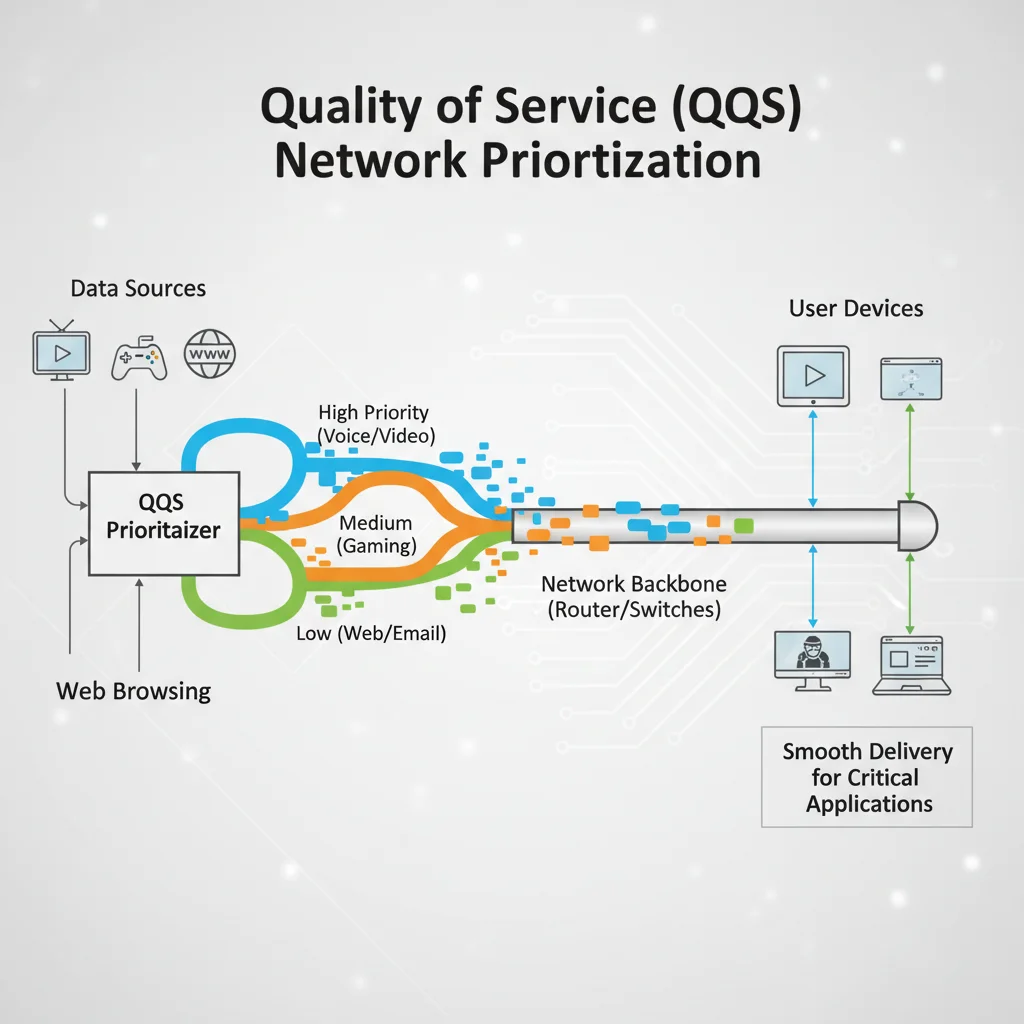
5. Quality of Service (QoS) and Traffic Prioritization
Many modern routers include Quality of Service (QoS) settings. QoS allows you to prioritize certain types of network traffic over others. For instance, you can prioritize video streaming or online gaming traffic to ensure a smooth, buffer-free experience, even when other devices are consuming bandwidth.
Practical Application: Configure QoS settings on your router to prioritize devices or applications that require consistent, high-speed downloads, such as your main streaming device, gaming PC, or work laptop. This intelligent traffic management can significantly improve perceived download speeds for critical tasks.
6. Mesh Wi-Fi Systems
For larger homes or spaces with dead zones, traditional single routers often struggle to provide consistent coverage. Mesh Wi-Fi systems, composed of multiple interconnected nodes, create a unified, seamless Wi-Fi network that blankets your entire area. This ensures that devices always connect to the strongest signal, maintaining higher download speeds even at a distance from the main router.
Practical Application: If you experience significant speed drops or dead spots in certain areas, a mesh Wi-Fi system can dramatically improve overall network performance and ensure that your 20% faster download goal is met consistently across your entire property.
Software and Network Configuration for Peak Performance
Hardware is only one part of the equation. Intelligent software and network configurations can further fine-tune your connection.
1. Updating Network Drivers
Ensure that the network adapters (Ethernet and Wi-Fi) on all your devices (computers, laptops) have the latest drivers installed. Outdated drivers can lead to inefficiencies and slower speeds. Check the manufacturer’s website for the most current versions.
2. Optimizing Operating System Settings
Both Windows and macOS offer various network-related settings that can be tweaked. For instance, in Windows, you can disable “Metered Connection” if you have unlimited data, as it can throttle background data usage. Regularly scan for and remove malware and bloatware, which can consume system resources and bandwidth.
3. VPN Usage (and its Impact)
While VPNs offer enhanced security and privacy, they can sometimes introduce latency and reduce download speeds due to the encryption and routing through remote servers. If speed is your absolute priority, consider temporarily disabling your VPN for critical downloads or using a VPN service known for its high-speed servers and optimized protocols.
4. Content Delivery Networks (CDNs)
Many popular websites and streaming services use Content Delivery Networks (CDNs) to distribute their content globally. CDNs store copies of content on servers closer to you, reducing the physical distance data has to travel and often resulting in faster load times and downloads. While this is largely controlled by the content provider, understanding its role helps appreciate how modern internet infrastructure aids speed.
The Future is Now: Emerging Technologies by 2026
Looking ahead to 2026, several emerging technologies will continue to push the boundaries of internet speed and reliability, directly contributing to our 20% faster download target.
1. LEO Satellite Internet (Starlink, OneWeb)
Low Earth Orbit (LEO) satellite internet constellations like Starlink and OneWeb are rapidly expanding, offering high-speed, low-latency broadband to previously underserved areas. Their proximity to Earth (compared to geostationary satellites) drastically reduces latency, making them a viable high-performance option for many.
Impact: For rural users especially, LEO satellite internet could be the key to unlocking significantly faster downloads, bridging the digital divide and offering speeds comparable to urban fibre connections.
2. 6G Research and Development
While 5G is still rolling out, 6G research is already underway. Expected to arrive in the early 2030s, 6G promises even higher bandwidth, ultra-low latency, and integration with AI and holographic communication. While not directly impacting 2026, the foundational research and early deployments may begin to influence related technologies and infrastructure upgrades.
3. Quantum Networking Concepts
Though still largely in the theoretical and early research stages, quantum networking aims to use principles of quantum mechanics to transmit information. This could eventually lead to ultra-secure and incredibly fast communication, though its practical application for consumer internet by 2026 is unlikely, its development highlights the continuous pursuit of faster, more secure data transfer.
Maintaining Your Optimized Network
Achieving 20% faster downloads isn’t a one-time setup; it’s an ongoing process. Regular maintenance and monitoring are key to sustaining peak performance.
- Regular Speed Tests: Periodically run speed tests to monitor your performance and identify any drops.
- Router Reboots: Make it a habit to reboot your modem and router every few weeks.
- Firmware Checks: Stay informed about new firmware releases for your network hardware.
- Network Monitoring Tools: Use tools that come with your router or third-party apps to monitor network traffic and identify bandwidth hogs.
- Review Your ISP Plan: As technology advances, ISPs frequently offer faster plans at competitive prices. Periodically review your plan to ensure it still meets your needs and offers the best value.
Troubleshooting Common Speed Issues
Even with all optimizations, you might encounter slow speeds. Here’s a quick troubleshooting guide:
- Isolate the Problem: Determine if the slow speed is affecting all devices or just one. If it’s one device, the issue might be with that device’s hardware or software.
- Bypass the Router: Connect a computer directly to your modem with an Ethernet cable. If speeds improve significantly, the issue is likely with your router or Wi-Fi setup.
- Check for Service Outages: Your ISP might be experiencing an outage or maintenance in your area. Check their status page or contact support.
- Scan for Malware: Malicious software can consume significant bandwidth and system resources. Run a full system scan.
- Contact Your ISP: If you’ve tried everything and speeds are still subpar, it’s time to contact your internet service provider. They can check your line, modem, and network for issues.
Conclusion: Your Roadmap to Superior Internet Speed
The journey to optimize internet speed and achieve 20% faster downloads by 2026 is a blend of smart, immediate adjustments and strategic adoption of emerging technologies. By understanding the fundamentals, meticulously evaluating your current setup, and implementing the practical solutions discussed – from optimal router placement and wired connections to embracing Wi-Fi 7 and potentially fibre or 5G FWA – you are well on your way to a significantly enhanced online experience.
The digital landscape is evolving at an unprecedented pace, and staying ahead means continuously adapting your network. With the insights and actionable steps provided in this guide, you are now empowered to take control of your internet performance, ensuring that your connection not only keeps up with but truly excels in the demands of 2026 and beyond. Prepare to download faster, stream smoother, and connect with unparalleled efficiency.